Quick start
- 1Open CloseReply. In Jira, choose Apps → CloseReply.
- 2Create a template. Give the reply a clear name and place it in a folder if useful.
- 3Write the response. Format it in the rich-text editor and insert Jira variables where details should change.
- 4Add media or follow-up work. Inline images, reusable files, field updates, and new-request defaults are optional.
- 5Check the preview. Make sure the content, line breaks, images, and signature will read naturally.
- 6Use it on a work item. Open the CloseReply action, choose a response, review it, and send.
Organize the response library
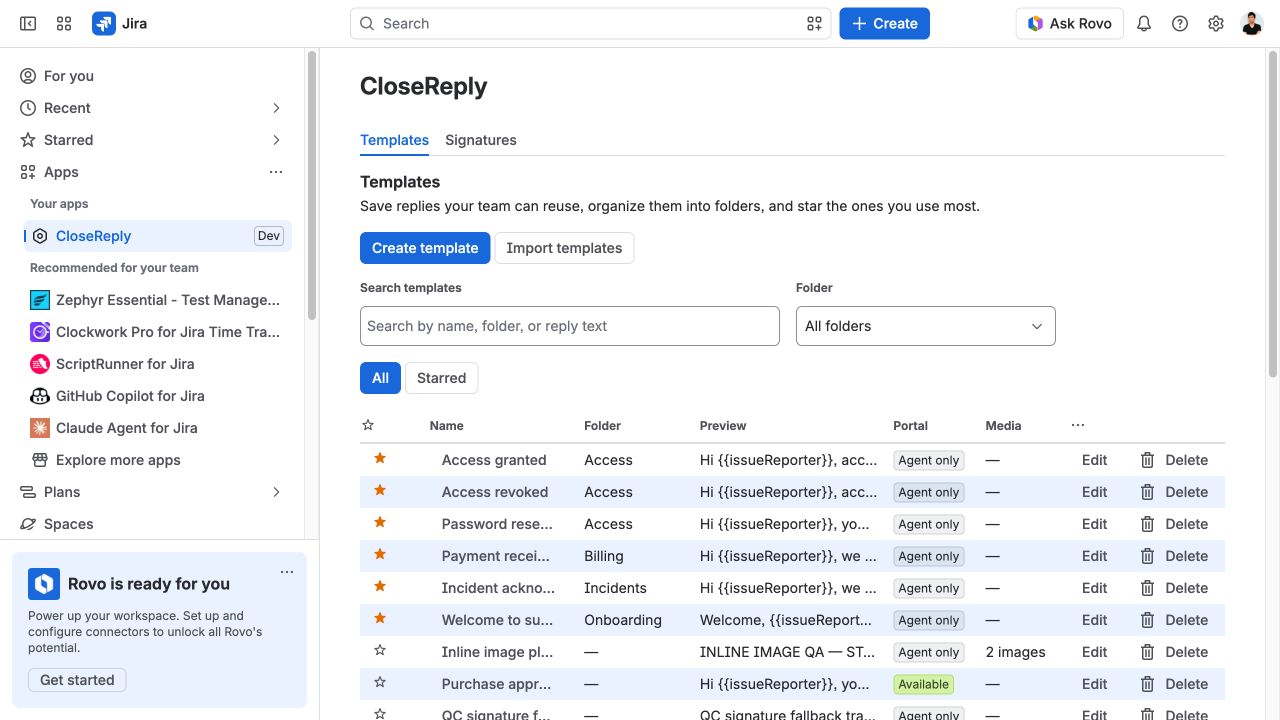
The Templates page keeps reusable replies in one searchable list. Search checks the name, folder, and reply text. Use the folder filter to narrow a large library, and select a template name to open it directly.
- Folders group related replies such as Access, Billing, Incidents, or Onboarding.
- Stars are private to the current Atlassian account, so one person’s shortcuts do not change the team library.
- Portal shows whether a text-only response is available to approved customer-portal users.
- Media makes reusable files and inline images visible before a template is opened.
- The list uses 25 rows per page and keeps its column headings visible while scrolling.
Create or edit a template
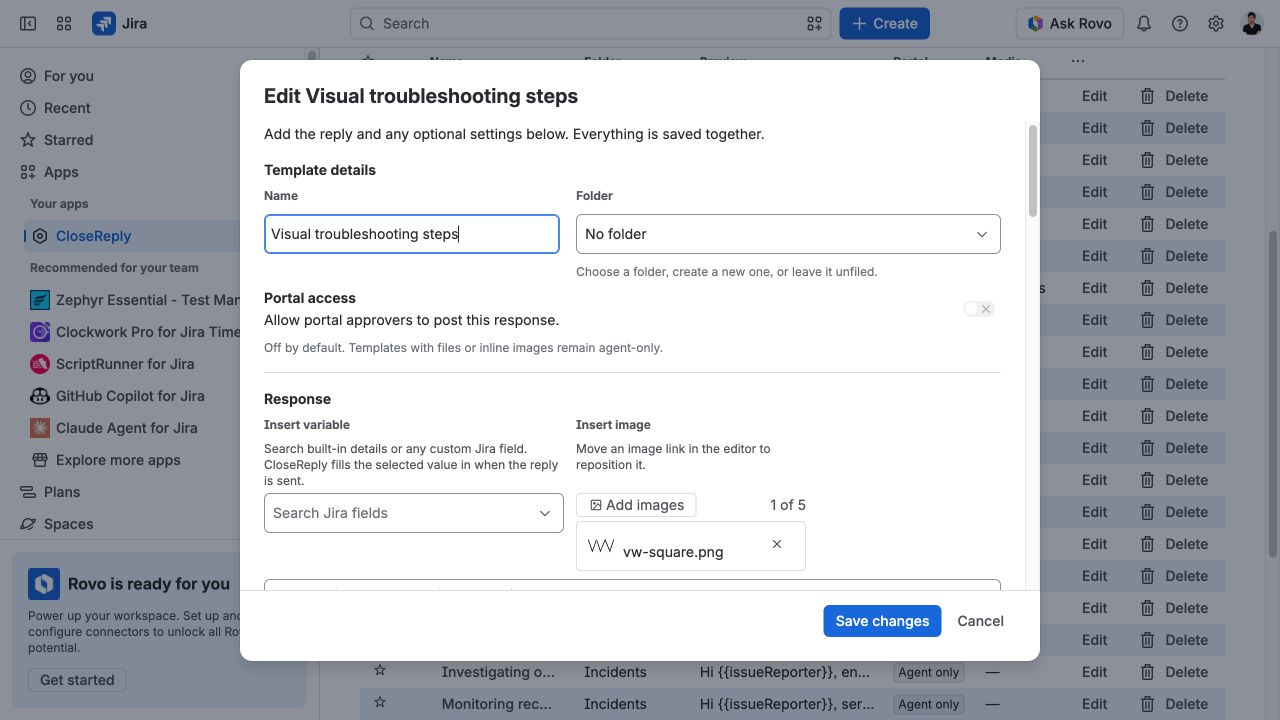
Select Create template, or choose a template name or its Edit action. Everything belongs to one form and is saved together.
- Enter a short, recognisable Name.
- Choose an existing Folder, create a new one, or leave the template unfiled.
- Decide whether the response should be available to portal approvers. Templates with files or inline images remain agent-only.
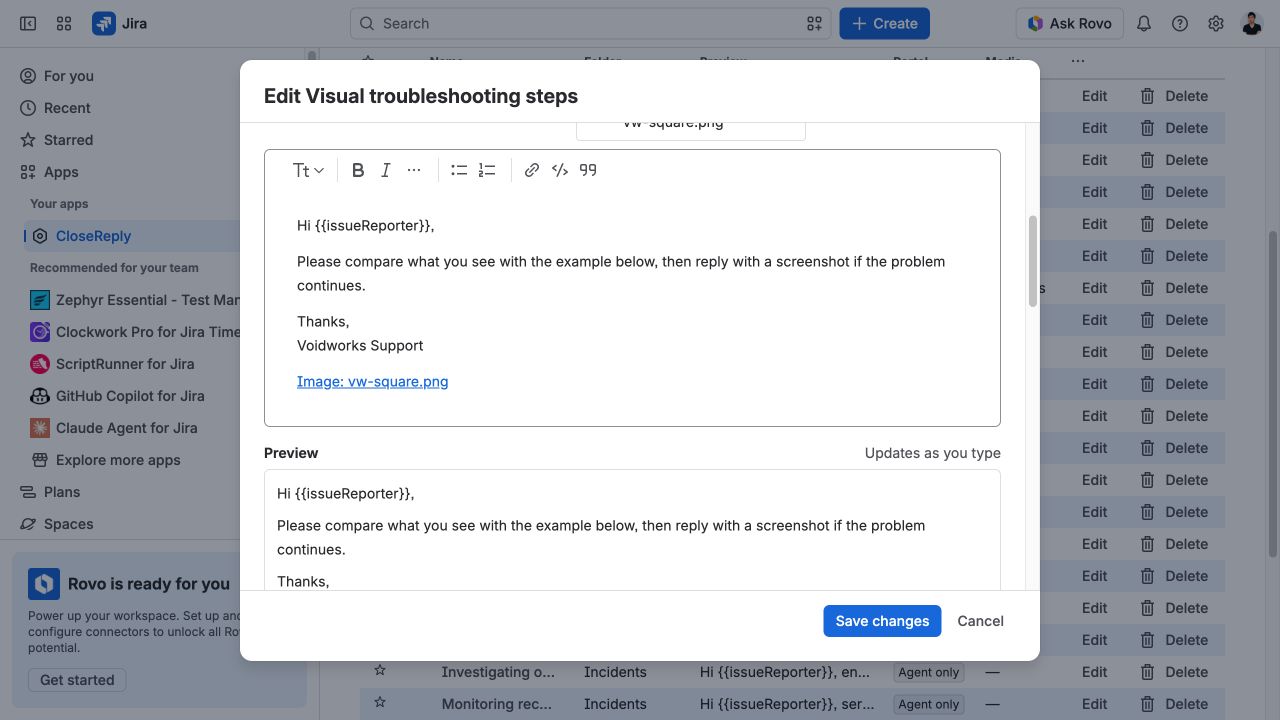
- Write the response in the rich-text editor. Use headings, emphasis, lists, links, code, and quotes when they help the reader.
- Review the live preview, then add any optional attachments or follow-up settings.
- Select Create template or Save changes.
Insert Jira variables
Variables are placeholders for Jira details that change from one work item to the next. Choose Insert variable, search by a friendly field name, and select a built-in value or any available custom Jira field. CloseReply inserts a token into the editor at the cursor.
For example, {{issueReporter}} becomes the reporter’s display name and{{issueKey}} becomes the current key when the reply is prepared. Always check the final preview: an empty Jira field produces an empty value.
Use inline images and reusable files
Inline images
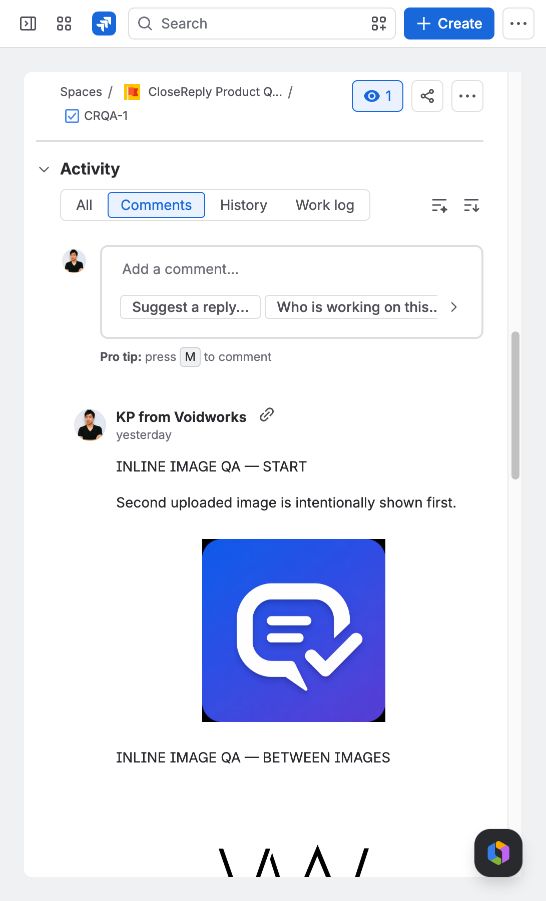
Select Add images beside the variable control. You can add up to five supported images to a template or signature. Each image appears as a named link in the editor and as the image itself in the preview. Move that link to change where the image appears in the sent reply.
- The compact image chip shows a thumbnail, a truncated file name when needed, and a remove button.
- Images keep their natural size, up to the width of the Jira reply container, so they do not overflow.
- Removing an image also removes its matching editor link.
- Images are attached to the Jira work item when the user sends the reply, then rendered inline in the comment.
Reusable attachments
Use the Attachments area for files that should accompany the reply rather than appear inside it—for example, a PDF checklist or troubleshooting log template. A template supports up to five files, 10 MB per file and 20 MB in total. Files upload when the template is saved and are copied to the Jira work item only after the sender confirms the response.
Send a response from a Jira work item
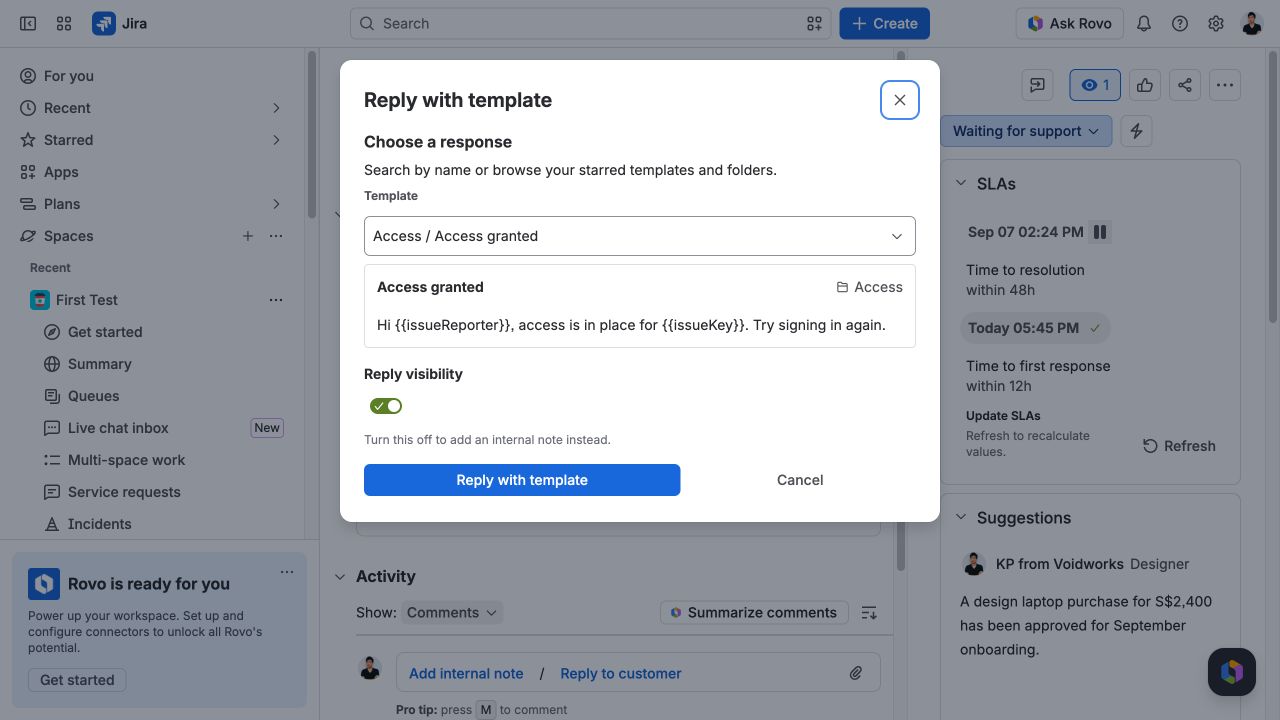
- Open the Jira work item and choose the CloseReply action from its app actions.
- Search for a response or browse your starred templates and folders.
- Choose whether the Jira Service Management comment is a customer reply or an internal note, when that option is available.
- Review the resolved response, signature, images, attachments, and any optional actions.
- Select Reply with template. CloseReply applies only the items that were shown for confirmation.
Inline images are real Jira attachments referenced from the final comment—not external image links. Their order in the Jira comment matches the image links in the template editor.
Configure signatures and fallback
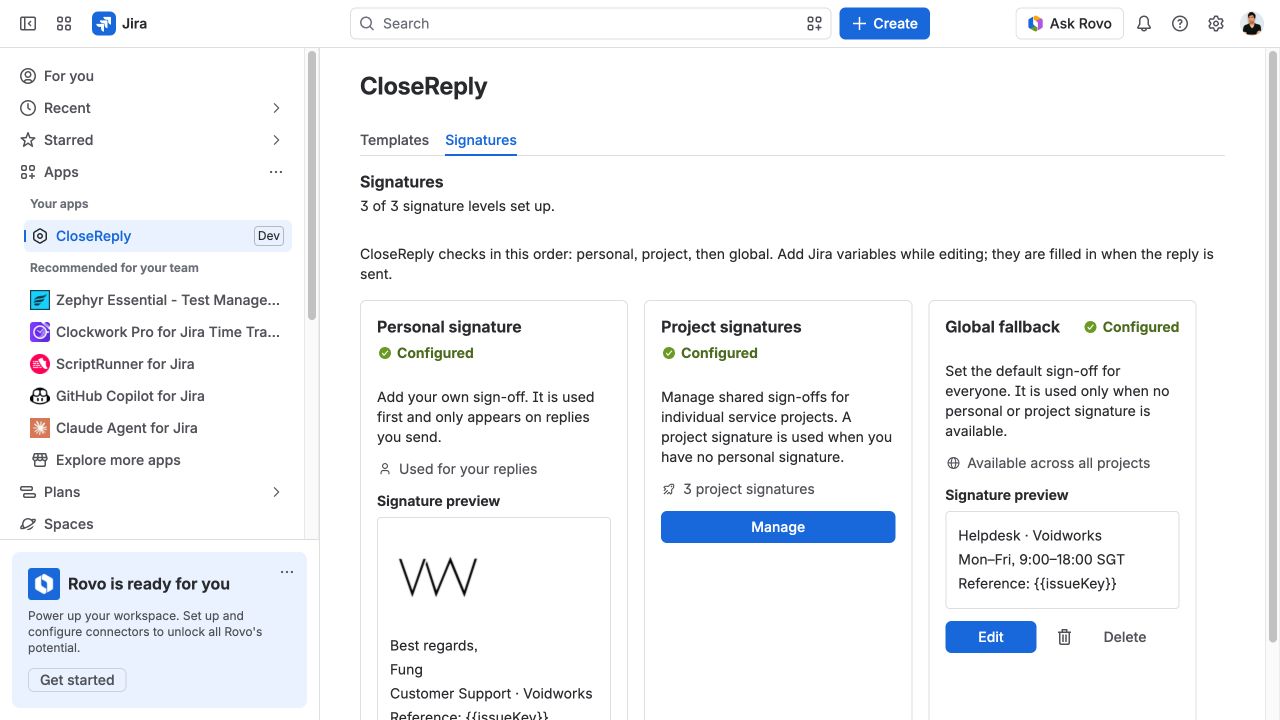
CloseReply checks signatures from most specific to broadest:
- Personal signature — the current user’s sign-off, used first and only on their replies.
- Project signature — the shared sign-off for the current project, used when that user has no personal signature.
- Global fallback — the default sign-off used when neither a personal nor project signature exists.
Personal signatures are managed by their owner. Jira administrators manage the project-signature list and global fallback. All three use the same rich-text editor, Jira variables, inline images, and live preview as response templates. The overview preview uses the same renderer as the editor and the sent reply.
Add optional follow-up work
After sending
A template can prepare Jira field updates to run after the reply. Add the Jira field ID and enter the value a person would expect to see—for example, Done. CloseReply validates and applies the update through Jira only after the sender confirms the combined action.
When creating a new request
You may save a starting request type and summary for requests created from the template. ChooseNone — choose when creating when there should be no default. The saved response becomes the new request description, and both starting values can still be changed before creation.
Share approved text on the customer portal
Portal availability is off by default. An administrator can enable a suitable text-only response for approved customer-portal users. To avoid exposing internal workflow, portal delivery excludes signatures, files, inline images, after-send actions, and private metadata. Review the final text as customer-facing content before enabling it.
Import existing templates
Import templates accepts a JSON or CSV export from Canned Responses Pro. CloseReply previews the rows before creating anything and reports rows that need attention. Direct import from Jira’s native canned responses is not currently available; it is tracked publicly as CRPT-1.
Start with ten editable response templates
The free CloseReply starter pack includes intake, clarification, incident-update, workaround, waiting, approval, and resolution replies. It uses only built-in CloseReply variables, so you can import it immediately and then adapt the language to your team. No email address or form is required.
- Download the JSON file below.
- In Jira, choose Apps → CloseReply → Templates → Import templates.
- Paste the file contents, review the preview, and import the rows you want.
- Open every imported template and adjust wording, folders, portal availability, media, and follow-up actions before production use.
Import supports CloseReply and Canned Responses Pro JSON/CSV structures. It does not currently read Jira Service Management’s native canned-response library directly.
Permissions, privacy, and site boundaries
- Templates and shared signatures stay inside the Atlassian site where CloseReply is installed.
- Personal stars and personal signatures are tied to an Atlassian account.
- Project signatures are selected by Jira project and managed by administrators.
- A user must still have the relevant Jira permission to comment, attach a file, update a field, transition work, or create a request.
- CloseReply runs on Atlassian Forge and has no external network egress configured.
Read the security overview and privacy policy for the full data-flow explanation.
Troubleshooting
A variable is blank
Open the Jira work item and confirm that the source field contains a value and that the current user can view it.
An image does not appear
Confirm the image chip still exists and that its matching image link remains in the editor. Save the template, reopen it, and check the live preview before sending.
A file or follow-up action fails
Check the current user’s Jira permissions and the field value expected by Jira. CloseReply reports the failed step rather than silently completing part of an action.
A template is missing from the portal
Confirm portal availability is enabled and remove any files or inline images. Media templates are intentionally agent-only.
Need more help?
Open a CloseReply support request, view the public work tracker, or email [email protected].